AI Appointment Booking That Works Over the Phone
Let callers book, reschedule, cancel, and confirm appointments through natural conversations while TurboCall syncs calendar, CRM, reminders, and call notes.
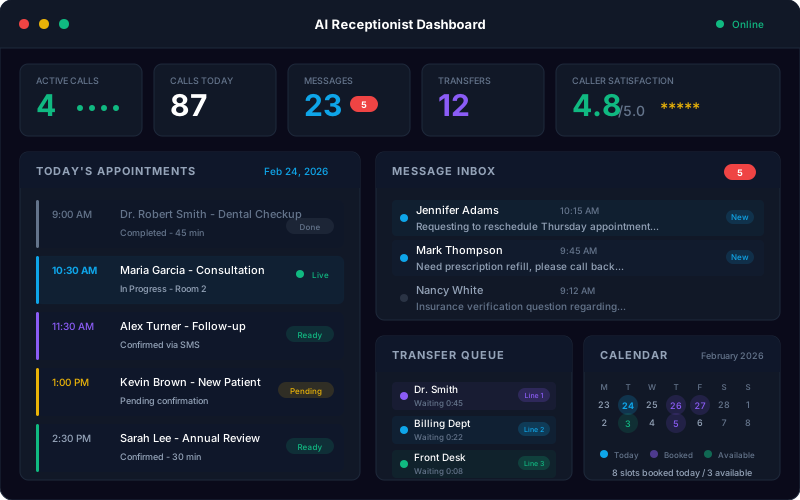
No credit card required. Test scheduling on a real phone call.
Key Takeaways
- Books, reschedules, and confirms by phone: TurboCall handles the appointment conversations people still prefer to have with a business line.
- Syncs scheduling data: Calendar events, CRM fields, call recordings, transcripts, reminders, and internal alerts can stay tied to the same customer record.
- Helps reduce no-shows: Reminder calls, confirmations, and easy rescheduling give customers a lower-friction path to keep or move their appointment.
Appointment Booking Capabilities
What Is AI Appointment Booking?
AI appointment booking is phone scheduling handled by a conversational AI agent. Instead of forcing callers to wait on hold, leave voicemail, or switch to an online form, the AI answers the call, understands the scheduling request, checks booking rules, and confirms the next step in the conversation.
The best appointment booking workflows cover more than first-time scheduling. They handle reschedules, cancellations, reminders, confirmations, waitlist requests, intake questions, service-area checks, appointment notes, and escalation to staff when a human should make the call.
TurboCall brings appointment booking into the same system as your AI receptionist, inbound call automation, outbound reminder calls, transcripts, CRM updates, and analytics. That gives your team one place to manage the full phone scheduling lifecycle.
How Does AI Appointment Booking Work?
From call request to confirmed appointment in four steps.
Caller Requests a Time
A customer, patient, prospect, or guest calls and asks to book, reschedule, cancel, or confirm an appointment.
AI Checks Your Rules
TurboCall verifies appointment type, location, staff rules, availability, business hours, intake questions, and escalation conditions.
Booking Is Confirmed
The AI offers suitable time slots, confirms the caller details, reads back the appointment, and records the caller approval before taking action.
Systems Stay Updated
Calendar, CRM, notes, call transcript, reminders, and team alerts are synced so staff have the complete booking context.
What Can AI Appointment Booking Handle?
Give callers a real phone conversation while your team gets clean booking data.
Phone Appointment Scheduling
Let callers book appointments through natural phone conversations while TurboCall checks availability, appointment type, duration, location, and routing rules.
Rescheduling and Cancellations
Handle "I need to move my appointment" calls without tying up staff. The AI confirms caller details, offers available times, updates the record, and logs the outcome.
Reminder Calls and Confirmations
Call customers before appointments, confirm attendance, capture cancellation reasons, and trigger follow-up workflows when someone needs a new time.
After-Hours Booking
Answer scheduling calls at night, on weekends, and during staff shortages so high-intent callers can book while they are ready to act.
Caller Qualification Before Booking
Ask the right pre-booking questions, verify service fit, capture urgency, collect contact details, and route the appointment to the right team or location.
Structured Intake Notes
Turn every booking call into clean data: caller name, phone, appointment type, reason for visit, preferred time, notes, transcript, and call summary.
Natural Conversation
Callers can speak normally, change their mind, ask for a different day, request the earliest slot, or explain constraints without navigating phone menus.
Multilingual Booking
Support appointment conversations across 40+ languages so callers can book, confirm, and reschedule in the language they are most comfortable using.
Human Escalation
Transfer complex, sensitive, urgent, or policy-heavy calls to staff with the caller context already captured.
Turn Scheduling Calls Into Confirmed Appointments
TurboCall answers appointment requests, asks intake questions, checks rules, confirms the caller details, and gives your staff a transcript-backed record of what was booked.
- Book, reschedule, cancel, and confirm appointments by phone
- Capture caller details, appointment type, urgency, and notes
- Sync booking outcomes to calendars, CRMs, and team alerts
- Route complex calls to humans with the conversation context attached
Run Reminder and Rebooking Calls Without Manual Follow-Up
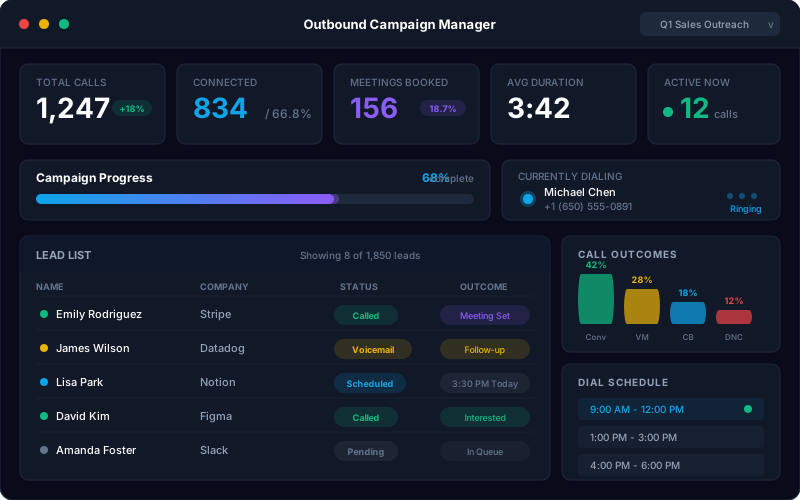
Use outbound AI calls to confirm attendance, reduce schedule gaps, capture cancellations early, and offer a simple path for customers who need a new appointment time.
- Automated reminder calls before appointments
- Confirmation and cancellation outcomes logged automatically
- Rebooking workflows for customers who need a new time
- Campaign analytics for answer rate, confirmations, and unresolved calls
Appointment Calls TurboCall Can Automate
Start with the appointment call types your team repeats every day, then expand into reminders, reactivation, and industry-specific workflows.
- Healthcare appointment requests
- Dental hygiene recall booking
- Law firm consultation scheduling
- HVAC and home-service estimates
- Roofing and solar site visits
- Real estate showing requests
- Salon and spa bookings
- Automotive service appointments
- Hotel reservation calls
- Sales demo booking
- Fitness class reservations
- Insurance consultation calls
AI Appointment Booking vs Forms vs Receptionists
Online forms are useful, and human staff still matter. TurboCall fills the phone scheduling gap between both.
Who Uses AI Appointment Booking?
Any team that depends on phone-based scheduling can use AI to capture more calls and keep calendars cleaner.
Healthcare and Dental
New-patient scheduling, recall booking, follow-up visits, cancellations, and reminder calls.
Home Services
Estimate booking, emergency intake, service windows, technician routing, and after-hours appointment capture.
Legal Services
Consultation booking with pre-screening questions, practice-area routing, and staff escalation for urgent matters.
Real Estate
Showing requests, open-house follow-up, buyer qualification, rental tours, and appointment reminders.
Salons, Spas, and Fitness
Class reservations, service appointments, membership calls, waitlist handling, and cancellation management.
Automotive and Hospitality
Service appointments, test drives, hotel reservations, table booking, and guest follow-up calls.
Related Scheduling Resources
Use these product pages and guides to connect appointment booking with the rest of your phone workflow.
AI Receptionist
Answer inbound calls, capture leads, book appointments, and route callers through a virtual front desk.
AI Phone Agent
Use one AI agent for inbound answering, outbound follow-up, booking, CRM sync, and human handoff.
Inbound AI Call
Automate incoming appointment requests, support calls, routing, and after-hours answering.
Outbound AI Call
Run reminder calls, confirmation calls, reactivation campaigns, and speed-to-lead follow-up.
AI Appointment Scheduling Guide
Learn how AI scheduling works, where it fits, and what to automate first.
Appointment Scheduling Automation
A practical guide to reminders, confirmations, cancellations, and rebooking flows.
Reduce Missed Calls with AI
See how AI answering helps capture calls that would otherwise hit voicemail.
Set Up an AI Phone Agent
Step-by-step setup guidance for launching AI phone workflows.
Frequently Asked Questions About AI Appointment Booking
The practical details buyers ask before letting AI schedule calls.
What is AI appointment booking?
AI appointment booking uses a voice AI agent to handle scheduling conversations over the phone. The AI answers calls, understands what the caller wants, checks booking rules and availability, confirms details, logs the conversation, and can update connected calendar or CRM systems.
Can AI book appointments over the phone?
Yes. TurboCall can answer phone calls, ask scheduling questions, offer available times, confirm caller details, and book the appointment when your calendar or scheduling system is connected.
Can it reschedule or cancel appointments?
Yes. TurboCall can handle common rescheduling and cancellation calls by verifying the caller, confirming the existing appointment details, offering new times, and logging the final outcome. You can route sensitive or unusual cases to a human.
Does TurboCall sync with Google Calendar?
TurboCall supports calendar-connected booking workflows, including Google Calendar-style scheduling. It can also connect with CRMs and custom systems through integrations, APIs, and webhooks depending on your setup.
Does AI appointment booking work after hours?
Yes. The AI can answer scheduling calls 24/7, including nights, weekends, holidays, lunch breaks, and staff shortages. Your team controls what it can book after hours and which calls should be escalated.
Can it send reminder calls?
Yes. TurboCall can run outbound reminder and confirmation calls. The AI can confirm attendance, capture cancellation reasons, help reschedule, and update the appointment status in connected systems.
What happens if the caller needs a human?
TurboCall can transfer the call or create an urgent team alert. The human receives the caller context, including the reason for calling, booking details, transcript, and any intake answers already collected.
Which industries use AI appointment booking?
Common industries include healthcare, dental, law firms, home services, real estate, salons, spas, fitness studios, automotive service, hotels, insurance agencies, mortgage teams, and B2B sales teams.
Can the AI qualify callers before booking?
Yes. You can define qualification questions for appointment type, urgency, service area, budget, insurance, preferred location, case type, property details, or any intake fields your team needs before booking.
How long does it take to launch?
Simple appointment booking flows can usually be tested quickly from templates. More advanced launches with multiple locations, custom CRM fields, compliance review, or custom scheduling APIs may take a few days to a couple of weeks.
Ready to Automate Appointment Calls?
Start with 10 free minutes, test TurboCall on a real booking call, and launch your first scheduling workflow from a template.